Sound Booster・Increase Volume
- 4.8
- Rating
- 10.00M
- Installs
- Free
- Price
 Analysis by App-foxy
I installed Sound Booster・Increase Volume because I wanted a practical way to make a phone or Bluetooth speaker sound louder without replacing the hardware. After using it as a volume-control tool rather than treating it like a complete music player, I found that its value depends heavily on what you are trying to improve. It can be useful when ordinary system volume feels too restrained, but it is not a substitute for better speakers, careful audio mixing, or a dedicated equalizer.
This is a free Music & Audio app from Prometheus Interactive LLC, available for Everyone and running on Android 5.0 or later. Its current version is 3.7.4, and its long presence on the platform is reflected in a 4.8 average from around 420 thousand ratings, alongside more than 10 million installs. Those figures suggest that the basic idea is easy for people to understand: open the tool, raise the output, and try to get more presence from a phone, headphones, or connected speaker.
How I Decided Whether It Was Worth Using
My first test was not simply “does it get louder?” Loudness alone is a poor measure. I listened for whether speech became easier to follow, whether music gained useful presence, and whether the sound became harsh once the control moved beyond the comfortable range. I also considered how quickly I could return to a normal level, because a booster that is awkward to manage can become more annoying than helpful.
You May Also Like

 Blood Strike: 2.5 Anniversary
Blood Strike’s Loadouts Turn Every Drop Into a Tactical Gamble
A close look at Blood Strike’s custom loadouts: how fast access to signature weapons reshapes its battle royale rhythm, rewards preparation, and narrows the gap between fights.

 Pandora - Music & Podcasts
Pandora’s Music Is Easy to Start, but Harder to Recover
Pandora’s strength is its low-effort path from a seed to a station. Its weak spot is how much confidence it asks you to place in connection, setup, and quiet recovery.

 8 Ball Pool
 Is Built on Rivalries, Rematches, and Routine
A close look at the rivalries, rematches, shared routines, and unanswered safety questions that turn a quick pool match into a persistent mobile community.

 Samsung Music
’s Quiet Strength Is Playing What You Already Own
Its reach comes less from spectacle than from dependable access to a personal library. That simplicity is both the app’s strongest retention engine and its ceiling.

 AccuWeather: Weather Radar
AccuWeather Review: A Quick, Clear Forecast for Everyday Decisions
For everyday plans, the best forecast is the one you can understand quickly. AccuWeather makes rain timing, radar, and local conditions easy to act on, with a few trade-offs.

 Hill Climb Racing
Why Hill Climb Racing Still Turns Crashes Into One More Run
A tiny car, a bumpy hill and one more upgrade: Hill Climb Racing keeps resurfacing because its simple chaos makes every near-miss feel personal.
More From Our News Desk



The most important decision is the audio source. A quiet podcast, an old video, a navigation instruction, and a compressed music track can all behave differently. Increasing output may help a voice cut through kitchen noise, while the same adjustment can make a bright song tiring. I recommend testing with something familiar and changing the level gradually instead of immediately pushing the control to its maximum.
There is also a hardware question. A phone speaker has physical limits, and software cannot create deep bass or detail that the small driver was never designed to reproduce. If the problem is weak hardware, this app can make the existing output more noticeable, but it may also expose distortion. That trade-off matters more than the headline promise of extra volume.
What everyday use feels like
A realistic example is listening to a spoken recipe while cooking. My phone may be on a counter several feet away, with water running and pans making background noise. In that situation, a moderate boost can make the voice easier to catch without repeatedly walking over to the screen. I would still lower the level before switching to music, because the setting that helps speech is not automatically pleasant for a full song.
Another useful situation is a quiet video played through a small Bluetooth speaker. Rather than changing the speaker immediately, I can try a controlled increase and see whether it solves the problem. If the speaker begins to sound rough, that is a clear sign to stop. The app is most useful as a quick adjustment layer, not as permission to ignore the limits of the device.
I also paid attention to the return-to-normal workflow. A volume booster is easy to misuse when the phone is later connected to headphones or a car system. My practical habit is to check the level before changing output devices and to reduce it after finishing a listening session. That small routine prevents the unpleasant surprise of suddenly loud audio in a quieter environment.
Where the app is strongest
The clearest strength is convenience. People who only need occasional extra output do not necessarily want to learn a full audio-editing application or replace their speaker. This tool focuses on the immediate problem and keeps the decision simple: adjust the sound, listen, and decide whether the result is acceptable.
It can also be more useful than a normal system volume slider when the slider already appears to be at its limit. That makes it a reasonable experiment for older phones, inexpensive speakers, or recordings whose dialogue is mixed too quietly. I would especially consider it for spoken content, casual video playback, and short listening sessions where clarity at a distance matters more than polished sound.
Its broad device compatibility is another practical advantage. Android 5.0 support means it is not restricted to recent phones, which is relevant if you are trying to improve an older handset rather than buying a new one. The app is free to install, so testing it involves less commitment than purchasing hardware first.
There is a useful distinction between “more audible” and “better.” In my experience, the app can help the first goal. It does not automatically improve separation, remove recording noise, restore missing detail, or make a small speaker behave like a larger one. That honest distinction is the main reason I would recommend it selectively rather than universally.
Three practical techniques that make a difference
First, test the boost with both speech and music before settling on a level. Speech reveals whether voices become easier to understand, while music exposes harshness and clipping more quickly. If a setting works for a podcast but makes cymbals or vocals unpleasant, I would keep it for spoken content only and return to normal output for music.
Second, use the app as a situational tool instead of leaving it active all day. A temporary increase for a distant phone or a quiet video is easier to control than a permanent setting. This approach also reduces the chance of forgetting the adjustment when moving to headphones, a car connection, or a louder external speaker.
Third, treat maximum volume as a warning point, not a target. The final portion of a volume range often produces less useful improvement than expected while making distortion more obvious. I found that a moderate setting can be the better compromise: the sound is easier to hear, but the speaker still has some room before it starts struggling.
A fourth tip is to judge the result from the position where you will actually listen. Standing beside the phone can make an increase seem impressive, while sitting across the room may reveal that the improvement is still limited. This simple test prevents wasting time fine-tuning a level that only sounds effective at close range.
What may make you choose another category
If your main goal is changing tone rather than increasing loudness, a conventional equalizer may be a better fit. An equalizer is designed around bass, treble, and frequency balance, so it can sometimes make a track feel clearer without pushing every part of the signal upward. That is a different solution to a different problem, and I would choose it when the sound feels muddy or too bright rather than simply too quiet.
If you want to organize and play a personal music library, a dedicated music player is more appropriate. This app is not the category I would choose for playlists, library management, metadata, or discovery. Its role is much narrower: it addresses output level, while a music player handles the listening experience around the tracks themselves.
Hardware is the stronger alternative when the speaker is the real bottleneck. A better Bluetooth speaker or a comfortable pair of headphones can improve volume, clarity, and listening distance at the same time. That costs more effort and money, but it avoids asking a tiny phone speaker to produce something beyond its physical design.
I would also skip this type of tool if you need precise audio production or reliable monitoring. Musicians, editors, and anyone checking a mix should use equipment and software intended for accurate playback. A volume boost can be useful for casual listening, but it is not the right basis for judging whether a recording is balanced.
Sound quality, comfort, and sensible limits
The main friction is the possibility of distortion. When output is pushed too far, voices may become abrasive and music may lose its natural balance. The exact result depends on the phone, the speaker, the headphones, and the source itself, so I would not assume that one setting works equally well everywhere.
Comfort matters too. Louder is not always easier to listen to, especially for long sessions. If I have to keep lowering the level because the sound feels tiring, the app has not really solved the problem. In that case, better positioning, quieter surroundings, or a more suitable speaker may be a smarter answer.
Another point is switching between sources. A level that feels modest for a quiet video can be excessive for a well-mastered song. I recommend checking the first few seconds whenever content changes, particularly if the phone is connected to headphones or a speaker shared with other people. This is a small inconvenience, but it is part of using any volume-boosting tool responsibly.
The age rating of Everyone makes the app broadly approachable, but that should not be confused with unlimited listening safety. I would still keep listening levels comfortable and avoid using extra volume to overcome loud surroundings for extended periods. The app can change output; it cannot remove the risks of listening too loudly.
Understanding the free model and upgrades
The app is free, which makes it easy to try before deciding whether it belongs in your regular toolkit. It includes in-app purchases ranging from $0.99 to $99.99 per item. That wide range is worth noticing before buying anything: I would inspect the purchase screen carefully and decide whether the basic experience already solves the specific volume problem.
For occasional use, I would begin with the free option and avoid paying simply because the sound is not perfect. If the limitation is the phone speaker itself, an upgrade inside the app may not deliver the same improvement as changing the hardware or choosing a quieter place to listen. The cost of switching to another solution is therefore not only financial; it can also involve carrying another device, learning a new player, or changing how you listen.
On the other hand, someone who frequently watches videos at a distance may value having a dedicated booster available instead of adjusting several unrelated settings. In that case, the convenience can justify further exploration, but I would still judge any purchase by repeated daily usefulness rather than by a single successful test.
Who should install it
I think it is a sensible download for Android users who regularly encounter quiet speech, underpowered casual speakers, or videos that sit just below a comfortable listening level. It is particularly suitable when the need is occasional and immediate, and when buying new audio hardware would be excessive for the problem.
I would be more cautious for people who mainly listen to music through sensitive headphones, care strongly about clean sound, or expect deeper bass and richer detail. Those listeners may be happier with a better audio source, an equalizer suited to tone control, or improved headphones. A louder signal is not automatically a more enjoyable one.
It is also not my first choice for anyone who wants a complete audio hub. The app makes sense beside a music player, podcast app, or video service, but it does not replace those categories. Think of it as a focused utility that can sit between the source and your ears when the standard output level is not enough.
My recommendation after using it
My recommendation is to try it when your problem is genuinely low output, not poor sound quality. The free entry point, support for older Android versions, and straightforward purpose make it an easy experiment. I would start with a familiar voice recording, raise the level in small steps, and stop as soon as the content becomes comfortably audible.
For me, the app earns its place through specific situations: a quiet spoken video, a phone placed farther away, or a small Bluetooth speaker that needs a little extra presence. It is less convincing as a permanent maximum-volume solution, and I would not use it to compensate for damaged hardware or to make long listening sessions uncomfortably loud.
Prometheus Interactive LLC has kept the product focused enough that its strengths are easy to understand. The current version is 3.7.4, and the app’s established user base shows that this simple use case continues to matter. Still, the right decision depends on your priority. Choose this tool for a quick volume adjustment; choose an equalizer for tonal control, a dedicated player for library features, or better hardware for a lasting improvement in sound.
In short, I would install it as a low-risk troubleshooting option and keep my expectations realistic. When used carefully, it can make everyday audio easier to hear. When pushed beyond what the speaker can handle, it can make the experience worse. That balance is the key to getting value from Sound Booster・Increase Volume rather than treating it as a magic fix.
FAQs for Sound Booster・Increase Volume
01What is Sound Booster・Increase Volume and how does it work?
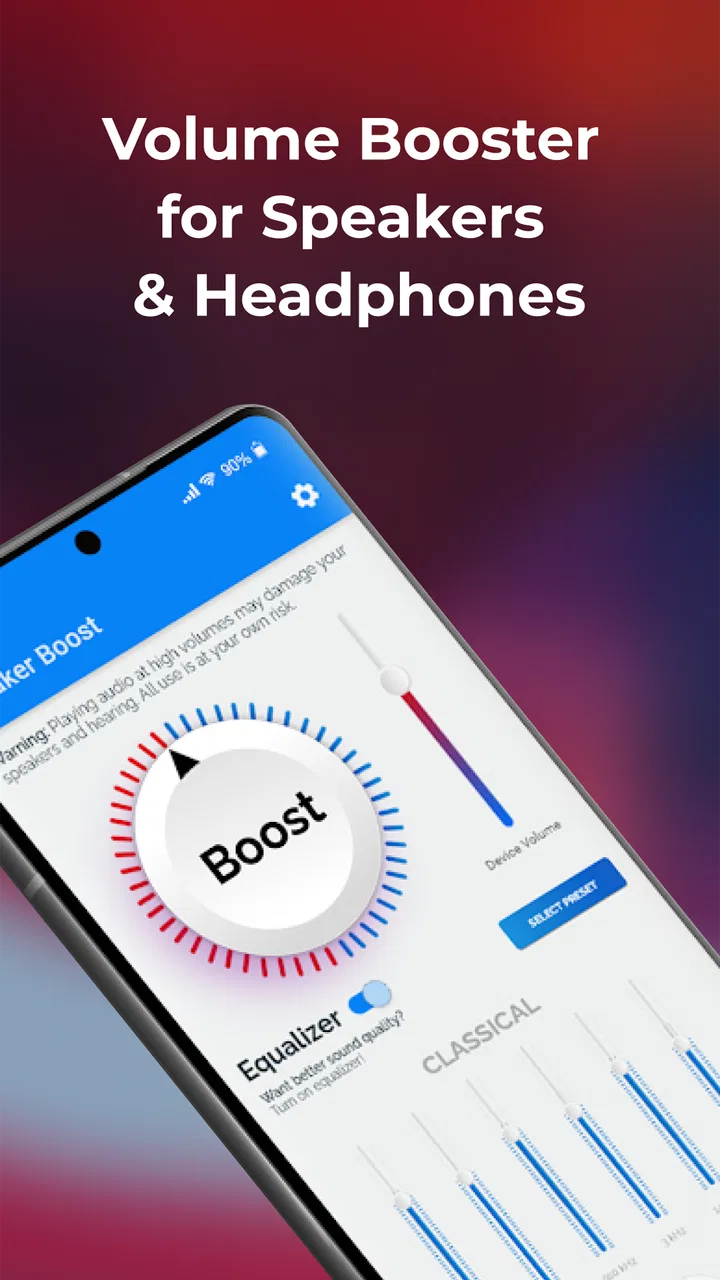
Sound Booster・Increase Volume is designed to make audio from your Android or iOS device sound louder, particularly when listening through speakers, headphones, or other connected audio equipment. It generally works by applying software amplification or equalizer adjustments to the device’s existing audio output. The actual improvement depends on your phone, operating system, app, and audio hardware, so it cannot always exceed the physical limits of the built-in speaker.
02Can Sound Booster・Increase Volume make every app louder?
The app may improve volume in supported audio sources, but it is not guaranteed to control every application in the same way. Some music players, video platforms, games, calls, and streaming services manage their own audio systems or restrict background volume controls. During testing, results can also vary between speakers, wired headphones, Bluetooth devices, and different operating-system versions. Check the app’s compatibility details before expecting universal support.
03Is Sound Booster・Increase Volume safe for my phone and hearing?
Using a volume booster at high levels can cause distorted sound, unpleasant clipping, or excessive strain on your phone’s speaker. More importantly, listening through headphones at very loud volume may damage your hearing over time. Increase the level gradually, reduce it if the sound becomes harsh, and take regular listening breaks. The app itself should not physically damage a device when used responsibly, but extreme amplification is not recommended.
04Does Sound Booster・Increase Volume work with Bluetooth headphones and speakers?
Compatibility with Bluetooth accessories depends on the device, Bluetooth profile, operating system, and the way the app processes audio. In some cases, the booster can affect the output sent to a paired speaker or headset; in others, Bluetooth volume remains controlled separately by the phone or accessory. If you use wireless audio, test the app at a moderate level and confirm that playback remains stable without lag, distortion, or unexpected volume changes.
05Is Sound Booster・Increase Volume free to download, and are there subscriptions or advertisements?
The download may be free, but the available features can depend on the app’s current pricing model. Some versions of volume-booster apps include advertisements, optional in-app purchases, premium controls, or subscription plans for removing ads and unlocking additional settings. Review the official store listing carefully before installing, especially the in-app purchase section and trial terms. Availability, pricing, and features may differ between Android and iOS.
Pros
- Boosts quiet audio beyond the device’s standard volume limit.
- Simple controls make volume adjustments quick and easy.
- Useful for music
- videos
- podcasts
- and spoken audio.
- Can improve clarity when using small or low-powered speakers.
- Lightweight design with minimal setup required.
Cons
- Excessive amplification may cause distortion or crackling.
- High volume levels can damage hearing or connected speakers.
- Results may vary between devices and audio sources.
- Some features may require in-app purchases or subscriptions.
- The booster may not work with every app or Bluetooth accessory.

Sound Booster・Increase Volume
Gallery